Recommendations
7 minute read
A StormForge recommendation represents a point-in-time determination about what the optimal resource settings for a workload are. A recommendation may include:
- Request settings for CPU and/or memory
- Limit settings for CPU and/or memory
- HPA target utilization settings for CPU and/or memory
- Max heap size settings for Java
- Pod scheduling node affinity settings for pods
StormForge regularly generates and updates its recommendations for every workload it watches. For workloads with split or temporarily low traffic, workload groups let StormForge aggregate metrics from related workloads before computing a recommendation.
For workloads that use GPUs, GPU optimization shows GPU allocation and usage alongside CPU and memory.
Workload optimization can be automated by enabling recommendation auto-deploy.
When auto-deploy is disabled, recommendations are advisory and can be viewed or applied on-demand.
Preliminary recommendations during the learning period
After installing StormForge or adding workloads, the learning period begins for the new workloads.
The learning period acts as an automation gate, preventing the Applier from deploying recommendations automatically for a defined number of days (by default, 7 days).
Recommendations generated during the learning period are referred to as preliminary recommendations: you can review them and apply them on demand (by clicking Apply Now on the workload details page), but they cannot be auto-deployed, even if auto-deploy is enabled.
Preliminary recommendations are generated at the intervals below, using the metrics collected up to that point in time:
- Within 10 minutes after installing StormForge or adding a workload. The first preliminary recommendation is available for review.
- Then, hourly for the first 23 hours. You might notice the recommendations becoming more refined as metrics collection continues.
- After 23 hours, they’re generated as defined by the recommendation schedule — by default, once daily (
@daily) — for the remainder of the learning period and beyond.
When the learning period ends, if auto-deploy is enabled, the recommendations are applied automatically as soon as they’re generated. Otherwise, you can apply them on demand.
To ensure that numerous workloads are not restarted at the same time, StormForge staggers the generation and applying of recommendations throughout the schedule period (when the schedule is an ISO 8601 Duration string or equivalent schedule macro). See the Schedule setting topic linked below.
We recommend waiting 7 days before applying recommendations because it typically takes about 7 days to complete a cycle of usage patterns on which to generate a recommendation that you can apply.
Schedule and learning period examples
The schedule and learning period settings determine how frequently recommendations are generated and how soon they can be auto-deployed, as shown in the examples below.
As mentioned above, preliminary recommendations are generated at 10min, hourly during hours 1-23 after installation or workload discovery.
- Default values: Schedule
P1D(or@daily), learning periodP7D
The first auto-deployable recommendation is available on day 7.
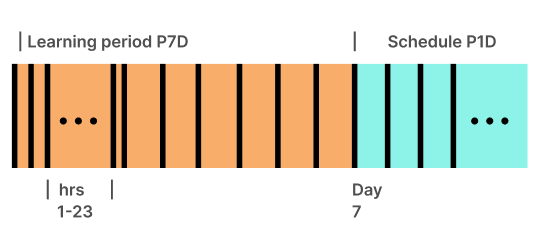
If you choose to shorten the duration of the learning period in specific scenarios as described in Auto-deployment sooner than 7 days:
-
Schedule
P1D(or@daily), learning periodP1D
The first auto-deployable recommendation is available 24 hours (1 day) after workload discovery.
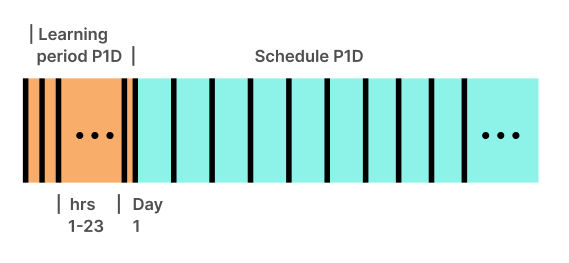
-
Schedule
P2D, learning periodP3D
The first auto-deployable recommendation is available on day 3 after workload discovery.
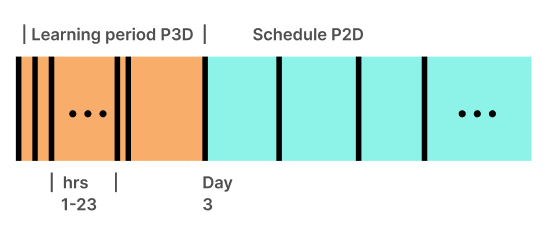
HPA recommendations
If a HorizontalPodAutoscaler (HPA) is enabled on the workload, StormForge detects the metrics that the HPA is configured to scale on and responds as shown in the following table.
| When an HPA scales on… | StormForge provides… |
|---|---|
| One or more resource metrics (CPU, memory) | Optimal requests and limits values, HPA target utilization |
| One resource metric and other multiple metrics | Optimal requests and limits values, HPA target utilization |
| Any metric(s), but no resource metric | Optimal requests and limits values |
StormForge can also be configured to:
Related information:
How StormForge generates recommendations
StormForge generates recommendations using patent-pending machine learning. The machine learning examines the metrics collected* (including CPU and memory requests and usage) and monitors usage patterns and scaling behavior to come up with the optimal settings for:
- CPU requests and limits
- Memory requests and limits
- HPA target utilization, if a workload is scaling on the HPA (see HPA recommendations above for details)
When generating a recommendation, the machine learning generates 3 candidate recommendations, one for each possible “optimization goal”:
- savings — most aggressive candidate
- reliability — least aggressive
- balanced — default, falls between the other 2 candidates
The more data that is collected, the better the recommendation that is generated, and the machine learning weights recent data more heavily. The recommendation schedule defines how often a recommendation is deployed and for how long that recommendation is considered “not stale.” For example, a recommendation with a daily schedule (the default value and best practice) should be deployed daily.
The machine learning also detects the following events and reacts accordingly:
- Spikes in a workload. These events are considered when generating recommendations.
- Scale-down events. Their duration determines whether a recommendation is generated. See Scale-down events below for details.
Best practice: To realize the most savings, consider generating and deploying recommendations frequently.
*For the full list of metrics, run:
helm show readme oci://registry.stormforge.io/library/stormforge \
| grep "## Workload Metrics" -A 18
Scale-down events
When a workload is scaled down for any reason, by any actor, the duration of the event determines whether a recommendation is generated:
- 0 replicas for an entire 7-day period: No recommendation provided because StormForge can’t collect workload metrics. When this occurs, you’ll see a message in the UI.
- 0 replicas for any shorter duration: Recommendation provided, and you’ll see a message in the UI.
Related information:
- Optimization goal setting
How the Applier applies recommendations
As described in the Applier concept, the Applier is installed by default and applies recommendations automatically or on demand.
The Applier applies recommendations using a combination of In-place Pod Resizing, Server-Side Apply patches, and Mutating Admission Webhooks. Use the apply method configuration option to control how recommendations are applied for individual workloads.
To ensure that numerous workloads are not restarted at the same time, the generation and applying of recommendations is staggered throughout the schedule period (when the schedule is an ISO 8601 Duration string or equivalent schedule macro). For details, see the Schedule setting linked at the end of this topic.
As soon as a recommendation is applied, the recommendation status is updated to either Applied or FailedToApply.
| Icon | Status | Validation | Rolled back |
|---|---|---|---|
| ✔️ | Applied | -- | -- |
| ❗️ | FailedToApply | -- | -- |
If the entire recommendation was applied successfully, StormForge then attempts to validate the rollout.
Rollout validation
After successfully applying a recommendation (whether by using patches or by using a webhook), StormForge monitors the workload status for 5 minutes (default value). If the workload enters an error state while being monitored, StormForge rolls back the applied recommendation and sets the recommendation status to FailedToApply (❗️).
During this monitoring period, StormForge checks for conditions such as CPU throttling, OOMKills, CrashLoopBackOff, pod start-up time, and so on.
Monitoring terminates when one of the following validation conditions is met:
- Timed out
The recommendation was applied but rollout validation didn’t complete within the monitoring period. No pods are in CrashLoopBackoff, so changes have not been rolled back. - Workload Became Ready
The recommendation is applied and the rollout is validated (all pods are healthy after applying the recommendation) within the monitoring period. - Workload Became Unhealthy
The rollout didn’t complete within the monitoring period. StormForge detected that either the rollout stalled with an error (such asProgressDeadlineExceeded) or at least one pod was in CrashLoopBackoff. If the workload became unhealthy, by default StormForge will roll back its changes.
| Icon | Status | Validation | Rolled back |
|---|---|---|---|
| ✔️ | Applied | Timed out | No |
| ✔️✔️ | Applied | Workload Became Ready | No |
| ❗️ | FailedToApply | Workload Became Unhealthy | Yes |
What gets rolled back?
The rollback operation reverts only the changes made to fields managed by stormforge at the time the patch was applied.
If an external field manager takes ownership of a stormforge-managed field after a patch is applied, a rollback is not performed, even if the workload is unhealthy. StormForge recognizes that another mechanism is available to heal the workload.
You can disable this rollback feature (see link at the bottom of this topic). If rollback is disabled, you might see the following icon and status in lieu of FailedToApply.
| Icon | Status | Validation | Rolled back |
|---|---|---|---|
| ⚠️ | Applied | Workload Became Unhealthy | No |
Workload drift reconciliation
You can control whether the Applier automatically reconciles workload drift, ensuring that recommended settings are maintained and not overwritten during CI/CD or deployment activity on the cluster. For details, see Continuous reconciliation in the Applier configuration topic.
Related information: